Monday, October 26, 2009

CCleaner 2.25.1025


Description:
CCleaner is a freeware system optimization, privacy and cleaning tool. It removes unused files from your system - allowing Windows to run faster and freeing up valuable hard disk space. It also cleans traces of your online activities such as your Internet history. Additionally it contains a fully featured registry cleaner. But the best part is that it's fast (normally taking less than a second to run) and contains NO Spyware or Adware! :)
Cleans the following:
  • Internet Explorer
  • Firefox
  • Google Chrome
  • Opera
  • Safari
  • Windows - Recycle Bin, Recent Documents, Temporary files and Log files.
  • Registry cleaner
  • Third-party applications

  • 100% Spyware FREE

Technical:
Title:CCleaner 2.25.1025
Filename:ccsetup225.exe
File size:3.16MB (3,310,608 bytes)
Requirements:Windows (All Versions)
Languages:en-US
License:Freeware
Date added:October 26, 2009
Author:Piriform

www.piriform.com

Change log:

- Improved Windows 7 jump list cleaning.

- Improved Windows 7 thumbnail cache cleaning.

- Added support for Windows Server 2008 R2.

- Improved 64-bit support and performance.

- Fixed issue with Windows 7 task scheduler.

- Fixed issue with Startup tool, displaying incorrect folder contents.

- Added support for AVG Antivirus 9.0.

- Added support for ExcludeKey in INI files.

- Improved support for wildcards and RECURSE/REMOVESELF.

- Fixed minor GUI bugs in non-English versions.

- Fixed minor GUI usability issues.

- Improved input validation.

- Lots of minor bugs fixed.

Sunday, October 11, 2009

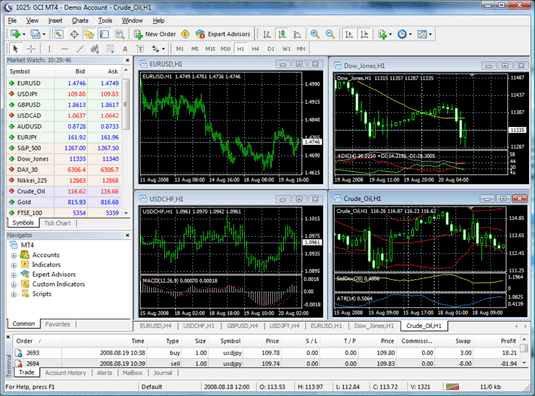
MetaTrader Trading Software


GCI now offers Forex and CFD trading on the popular MetaTrader 4 trading platform. Trading directly from charts, fractional lot capabilities, the ability to program trading signals, and unlimited charts and technical indicators are among the many benefits. MetaTrader is ideal for novice traders and professionals alike. All major currency orders are filled directly in the interbank market, with no dealer intervention or delays.

Test MetaTrader software for free: download the installation file (gci4setup.exe, 3.5Mb) to your PC, launch it and install the program, checking for instructions appearing on your monitor.

Software Download
ICTS Web-Based (Java) Trading Software: No download necessary - login to your demo account here
ICTS Windows-based Trading Software: Download HereMetaTrader Trading Software: Download Here
ICTS Software FAQs
How Do I Place a Trade?
How Do I Close a Position?
There are products I want to trade that are not in the Dealing Prices window. How can I add them?

FXDD Auto


FXDDAuto provides FXDD clients a fully automated trading system that executes signals and strategies from third party signal providers in an FXDD trading account.
With the FXDD Auto platform, traders have the ability to monitor, control and configure trades from signal providers. A trader's presence is not required to enter or exit trades. Execution and money management is automatic, and includes trailing stop losses, stop and limit orders and trade updates.

The advantages of FXDD Auto are:
Fully automatic trade execution on a remote server.
Trade for only 1 pip commission. NO SIGNAL FEES!
Multiple signal providers on same account for diversification.
Stable, robust and easy-to-use platform.
Trade from $10k lot size upwards.
Never miss a trade – work, sleep, and other commitments will not interfere.
Transparent trading results from signals providers. Trade notifications by email for opened/closed trades.
Trade notifications by e-mail for opened/closed trades.
Three modes of money management available. Free 30-Day DEMO with trading signals.
Assists traders with overcoming the barriers of trading (e.g., poor money management, lack of discipline, and portfolio management).
Multiple systems available - trade an unlimited number of signal providers.

Saturday, October 10, 2009

QuickTime Alternative 3.0.0


DESCRIPTION:
QuickTime Alternative is a trimmed-down version of QuickTime that contains only the essential components needed for playing QuickTime content that is embedded in webpages.
Advantages of QuickTime Alternative are:
1.Quick and easy install
2.Ability to make an unattended installation
3.No background processes
4.No unwanted stuff and other nonsense
5.Smaller size than Apple QuickTime
It comes bundled with Media Player Classic - a freeware media player that supports both QuickTime Alternative and Real Alternative.


TECNICAL:
Title: QuickTime Alternative 3.0.0
Filename: QuickTime_Alternative_300.exe
File size: 17.83MB (18,701,300 bytes)
Requirements: Windows XP/2003/Vista/Windows7/XP64/Vista64/Windows7 64
License: Freeware
Date added: October 10, 2009
MD5 EF1238827D8B0AEDA7D0F8C6EAB757C3
Checksum:
CHANGE LOG:
Updated QuickTime framework to version 7.64.17.73
OLD VERSION:

File Renamer 1.2.0.3

Downloads: Total: 1 319 Last Week: 0
Publisher: Jose Falcao (5 other programs)
OS Support: Windows 95/98/Me/NT/2000/XP
License: Freeware; $0.00 to buy
Date added: 09/26/2005
Last Update: 08/06/2009
Size: 430 KB

File Renamer Publisher's Description:
File Renamer will let you rename all your files and folders, but with a lot more options. Can batch rename files, add or remove strings to filenames, change file extensions, numerate filenames sequentially, convert to uppercase or lowercase, trim characters, replace strings, and some more.. Works with multiple directories, suports Drag and Drop and works from the command line. Also has 'undo' function for past renames done.

Friday, October 9, 2009

Latest Version Of Vista Codec Package 5.4.6


Shark007 - 20.18MB (Freeware)

DESCRIPTION:
All the codecs you need for Vista to play AVIs, DVDs and more! It does not contain a media player and it doesn't associates filetypes. With this package installed you will be able to use any media player, limited only by the players' capabilities, to play DVD's, movies and video clips of almost any filetype. Streaming video is supported in all popular web browsers. By default you won't need to make any adjustments to enjoy a variety of media content immediately. Users have the ability to choose what is installed using the public redistributable or after an unattended install, you can select to remove specific portions without removing the entire package. Future releases will recognize previous releases and are capable of performing upgrade installations. The Vista Codec Package is also compatible with all versions of Windows XP.

TECNICAL:
Title: Vista Codec Package 5.4.6
Filename: VistaCodecs_v546.exe
File size: 20.18MB (21,162,356 bytes)
Requirements: Windows XP/Vista/Windows7/XP64/Vista64/Windows7 64
License: Freeware
Date added: October 9, 2009
Author: Shark007


MD5 Checksum: 71BEFCA189B5FAF5907D678FB40CB638

CHANGE LOG:

- update Gabests filters 1296

- update ffdshow 3096

- fix some choppy avi's

- add linked files to the MKV TAB

- add informative filetype descriptions
Old Versions: